OPEN SOURCE · NATIVE FOR macOS
Clean by design.
Uninstall apps, remove leftovers, and reclaim space with a lightweight native macOS utility.
Free beta 0.3.0-beta.1 · macOS 13.0 Ventura or later · Apple silicon & Intel
FEATURES
Everything an app leaves behind, in one calm view.
Two focused tools, done carefully: uninstall applications completely, and clean up what is already left over.
Application uninstaller
See every app with its size and the files it keeps in your Library — caches, preferences, containers, logs and launch agents — before you remove it.
Leftover cleanup
Find what removed apps left behind, plus disposable caches, old temporary files and old logs, grouped into safe items and items that need review.
Conservative safety checks
Every item is evaluated before it is shown and again right before it is moved. Anything uncertain or protected stays unselected or locked.
Trash-first removal
MacSweep only moves items to the Trash, after you confirm a list of exactly what will move. Restore anything from the Trash until you empty it.
Native macOS experience
Built with Swift and SwiftUI for Apple silicon and Intel. Light and dark appearance, keyboard shortcuts, and the native look of each macOS version.
Open source and private
MIT-licensed and free. No accounts, ads, subscriptions, analytics or network access — scanning happens entirely on your Mac.
THE APP
Three screens. Nothing hidden.
Real screenshots of MacSweep, shown with fictional sample apps.
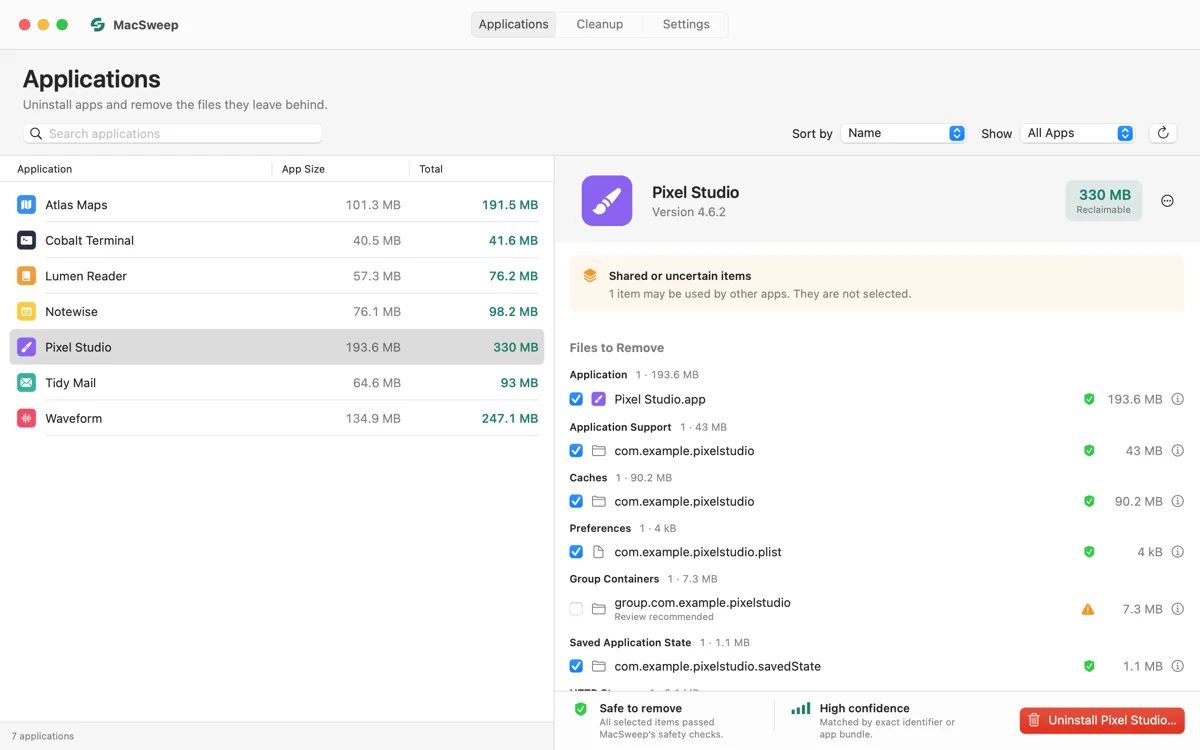
Applications
Pick an app to see what an uninstall would remove: the app itself and its files, each with its size, ownership confidence and a safety status. Shared containers stay unselected.
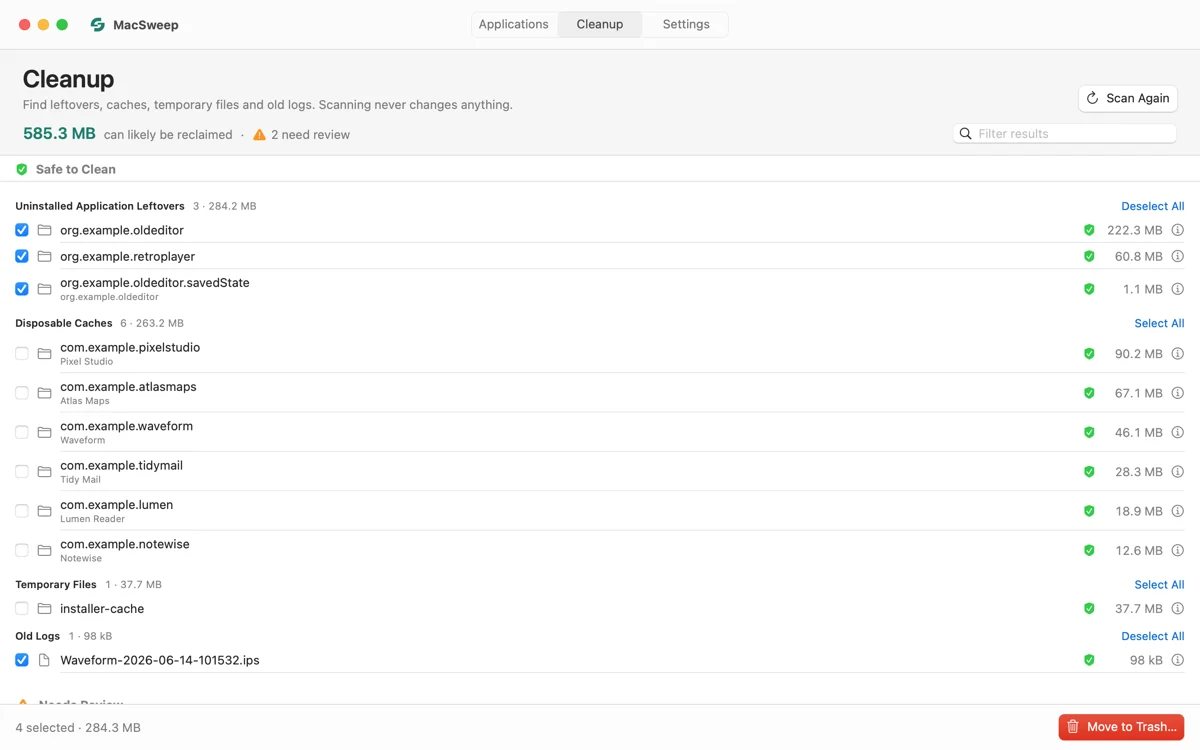
Cleanup
A read-only scan groups findings into Safe to Clean and Needs Review. Only safe items can start selected; review items never do.
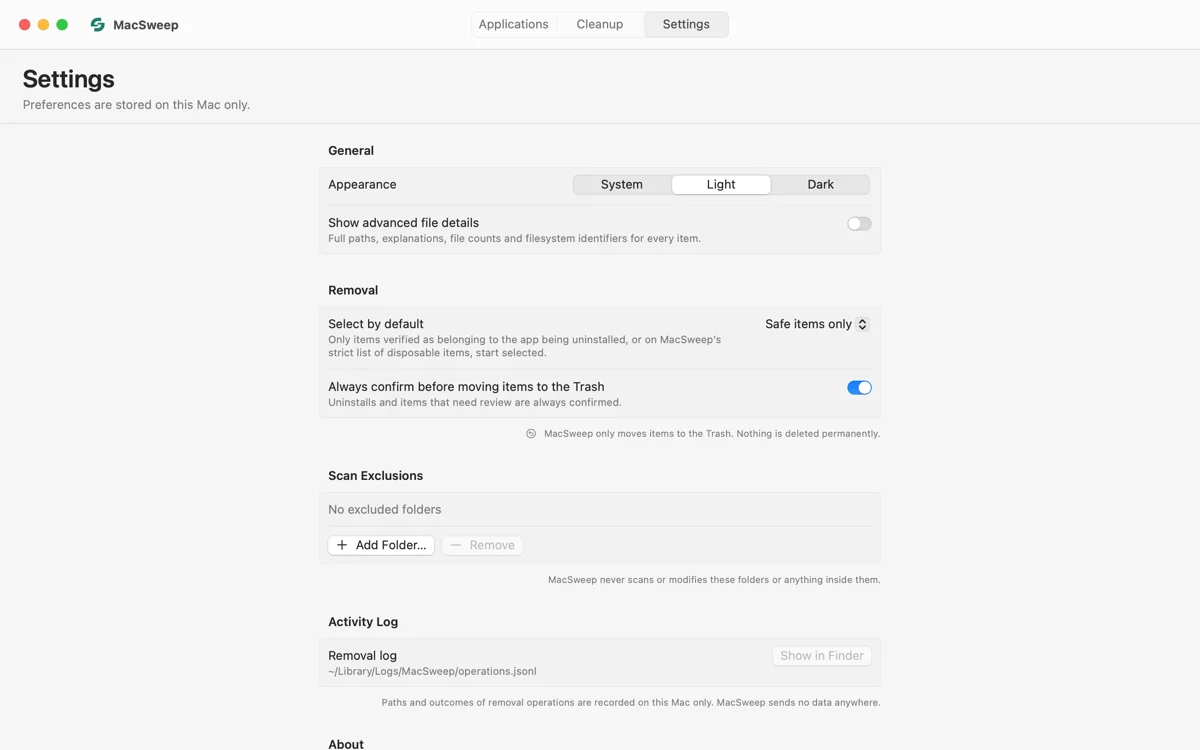
Settings
A short, native settings page: appearance, default selection policy, confirmations, scan exclusions and the local removal log.
SAFETY
Careful by default.
A cleaner should never surprise you. MacSweep leaves anything it cannot verify for you to decide, and keeps every removal recoverable.
No cleaner can guarantee that every file it finds is unused, or that every trace of an app is found — some apps install system components that need their own uninstaller. MacSweep tells you when that is the case.
Read the security modelRead-only scanning
Scanning only reads your user folders. Nothing is changed until you review the results and confirm.
Conservative selection
Only items MacSweep can attribute with high confidence start selected. Everything uncertain waits for your review.
High-confidence matches
Files are matched by exact bundle identifiers and app structure, never by partial names. Shared containers are never preselected.
Protected data stays protected
System folders, keychains, SSH keys, documents, photos, mail, browser profiles and cloud storage are locked — never removable.
You confirm every removal
A sheet lists exactly what will move to the Trash. Each item is checked again right before it moves; anything that changed is skipped.
Recover from the Trash
Items are moved to the Trash, never deleted permanently. Changed your mind? Put them back from the Trash.
DOWNLOAD
Get MacSweep.
Free and open source. One universal app for Apple silicon and Intel Macs.
SHA-256 ccd8a5dc74616667f84f94db2bf4f6e372e3b5888bcc3cabae910343f0c9db83
- Version
- 0.3.0-beta.1 (beta)
- Released
- November 11, 2026
- Requires
- macOS 13.0 Ventura or later
- Runs on
- Apple silicon and Intel
- Download
- MacSweep-0.3.0-beta.1.zip · 1.7 MB
- License
- MIT, free and open source
This is a beta. Unzip MacSweep, move it to Applications and open it. Please report anything unexpected on GitHub Issues.
Tested on macOS 15 Sequoia and 26 Tahoe. Support for macOS 13 Ventura and 14 Sonoma is experimental — the app is built for them but has not been run on them yet. Compatibility details
CONTACT
Get in touch.
Found a bug, have an idea, or want to talk about something else? Send a message. It goes straight to the developer, and you'll get a reply by email.
- Bugs: what you did, what happened and what you expected. Your macOS and MacSweep versions help a lot.
- Messages are delivered by email through Web3Forms. Your address is used only to reply. Please don't send passwords or personal files.
- Security issue? Follow the security policy instead.